The keypoint annotation tool that knows your skeleton.
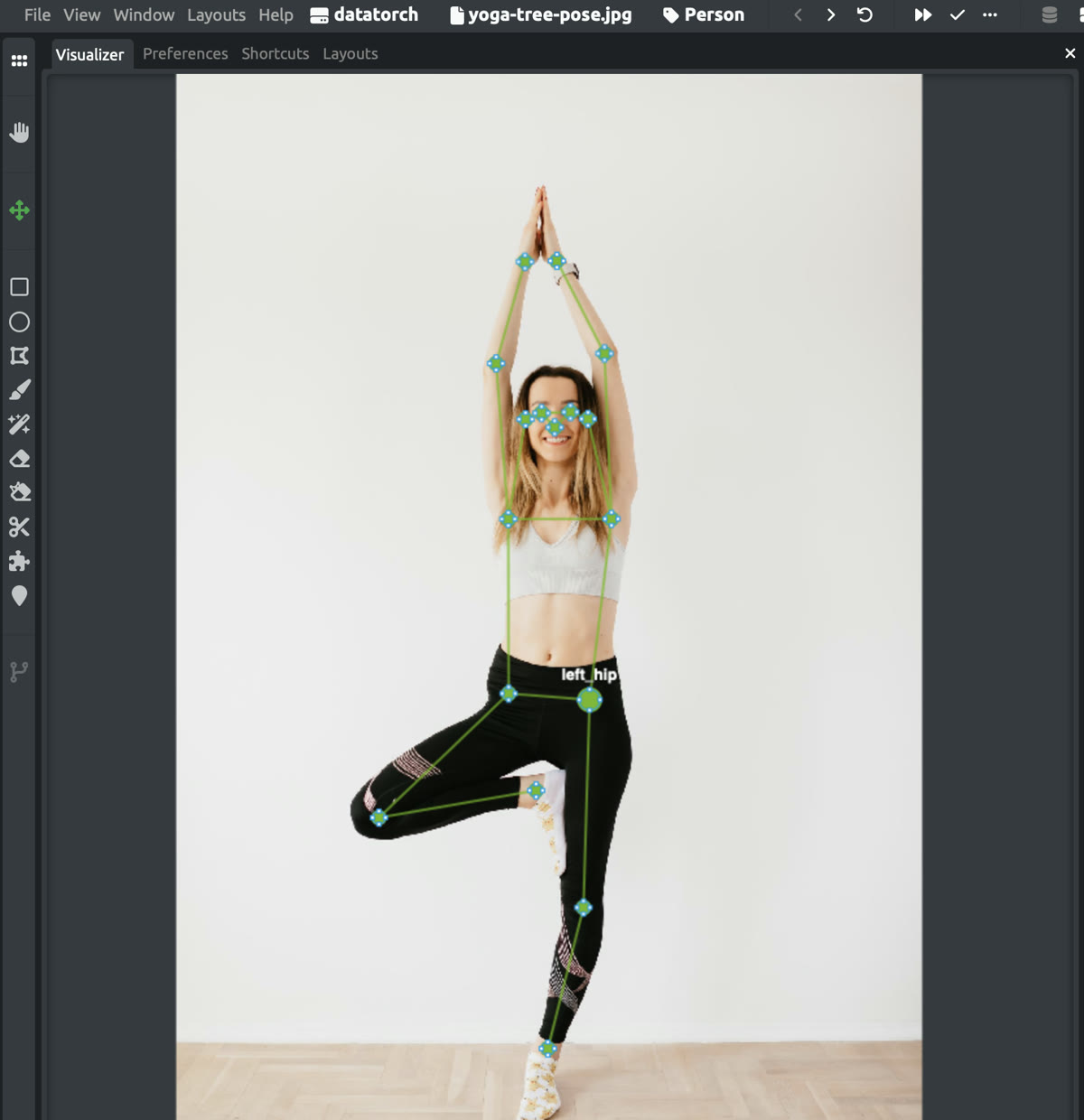
Define the keypoint names and skeleton once, on the label. DataTorch then walks every annotator through the points in order, renders the skeleton as they click, and round-trips the whole thing through COCO, visibility flags included.
Free plan includes a private project. No card required.
Keypoint labels fail in the details.
Boxes forgive sloppiness; keypoints don’t. One annotator clicks the wrist before the elbow, another mirrors left and right, a third skips occluded joints without marking them, and the errors are invisible until a pose model trains badly. Generic annotation tools leave point order and skeleton consistency up to each person’s discipline.
Guided point order
The tool walks each annotator through the named keypoints in sequence and shows which point is next. No more misordered joints or left/right swaps.
Skeleton on the schema
Define keypoint names and skeleton edges once, on the label. Every annotator inherits them, and the skeleton renders live as points go down.
COCO in, COCO out
Import existing COCO keypoint datasets (categories, skeletons, [x, y, v] triplets), annotate, and export training-ready COCO back out.
Occlusion-aware format
The data model carries COCO visibility flags end to end, so labeled-but-occluded points survive the round trip into your training set.
The skeleton lives on the label, not in a wiki.
Keypoint names and skeleton edges are part of the label definition: the same schema that drives the guided tool, the live overlay, and the COCO export. When the definition changes, it changes for everyone at once, and the annotation UI enforces it instead of a style guide asking nicely.
Review works like everything else on DataTorch: keypoint annotations flow through the same expert-review workflow and dataset version comparison as boxes and polygons.
{
  "name": "person",
  "metadata": {
    "keypoints": [
      "nose", "left_eye", "right_eye",
      "left_ear", "right_ear",
      "left_shoulder", "right_shoulder",
      "left_elbow", "right_elbow",
      "left_wrist", "right_wrist",
      "left_hip", "right_hip",
      "left_knee", "right_knee",
      "left_ankle", "right_ankle"
    ],
    "skeleton": [
      [16,14],[14,12],[17,15],[15,13],
      [12,13],[6,12],[7,13],[6,7],
      [6,8],[7,9],[8,10],[9,11],
      [2,3],[1,2],[1,3],[2,4],
      [3,5],[4,6],[5,7]
    ]
  }
}COCO-native, and in production.
Keypoint work running on DataTorch today spans robotics competition teams, human-pose datasets, and facial-landmark projects, imported from and exported to COCO without a conversion script in sight. The platform behind it appears in published research from University of Sydney, University of Arizona, TU Wien, and National Institute of Fashion Technology.
See it on your own images.
Start with a free private project, or book a demo to discuss your team’s images, models, and review workflow.
datatorch@datatorch.io · we reply within a business day

Tools and community for image annotation: label, review, and share datasets, from everyday photos to the imagery only specialists can read.
© 2026 DataTorch. All rights reserved.